10,000 compliance requirements. One tool. Zero training
COMPANY
Mosey
DURATION
2 Bi-Weekly Sprints
ROLE
Founding Product Designer
OVERVIEW
The infrastructure that scaled a startup into an acquisition
Two years of embedded context, four weeks of build, one tool that onboarded fifty engineers with zero training
Mosey is an HRTech SaaS provider that automates state and local compliance for businesses operating across all 50 states. Their rules engine covers 10,000+ requirements across 53 states and more than 1,000 localities. To meet growing demand, the DevOps team needed to scale from 5 engineers to 50 in a single push, across two waves of 25. The existing internal tool couldn't support that. It was a raw admin panel on localhost that required tribal knowledge held by three engineers. Nobody else could operate it safely.
This project didn't start with a formal discovery phase. As Mosey's sole designer for 2+ years, I had accumulated the context most projects spend weeks gathering. I'd watched operations struggle with the admin panel daily, sat in the meetings where scaling was discussed, and seen tooling surface as the bottleneck every time. Two weeks of design and two weeks of development produced the workflow automation platform that absorbed the onboarding load by design. Mosey closed $18MM Series A three quarters later. In April 2026, Gusto acquired Mosey. The compliance infrastructure built during this engagement was central to what made the product worth acquiring.
A growing SaaS startup was bottlenecked by the one tool nobody else could operate
The Challenge
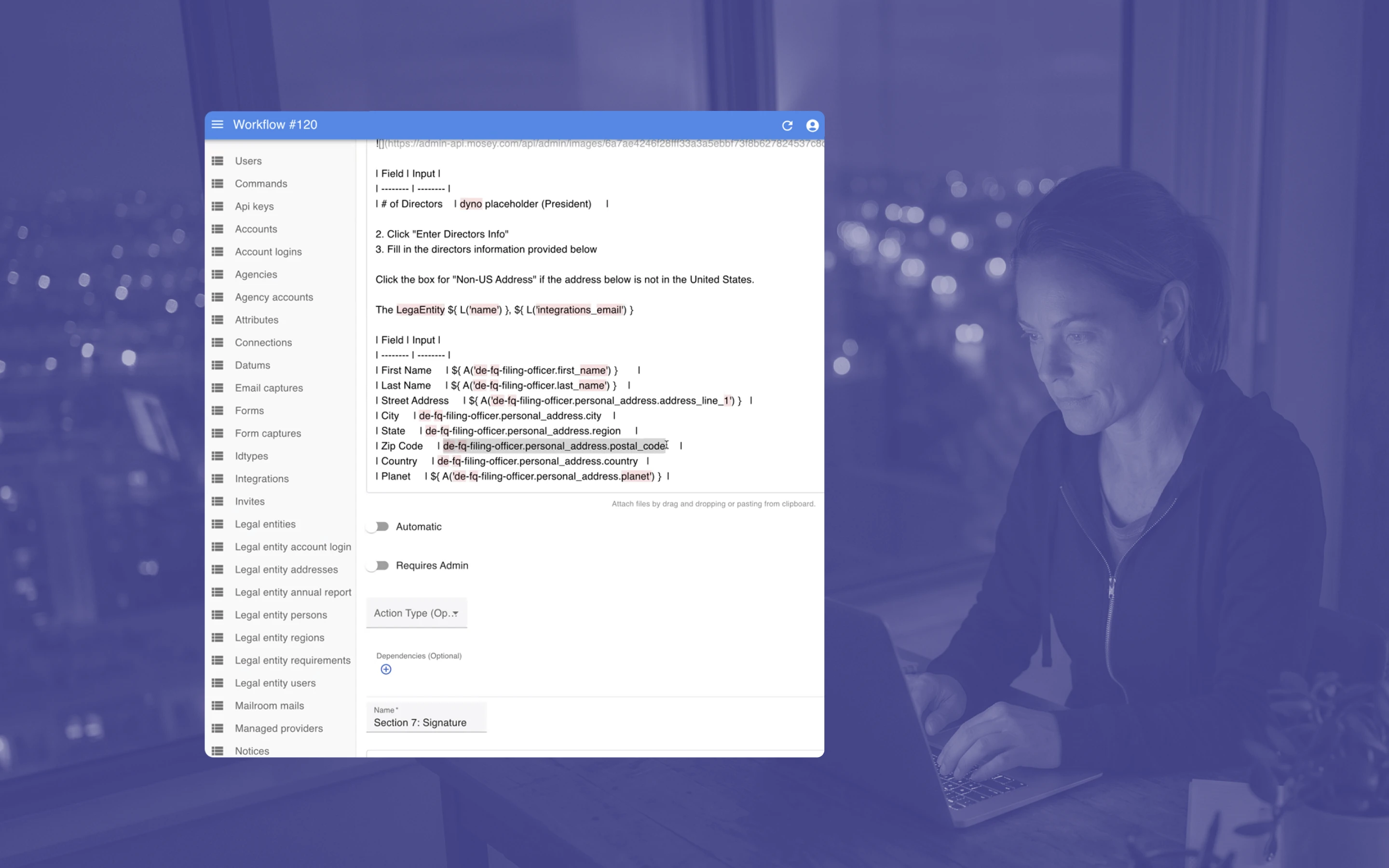
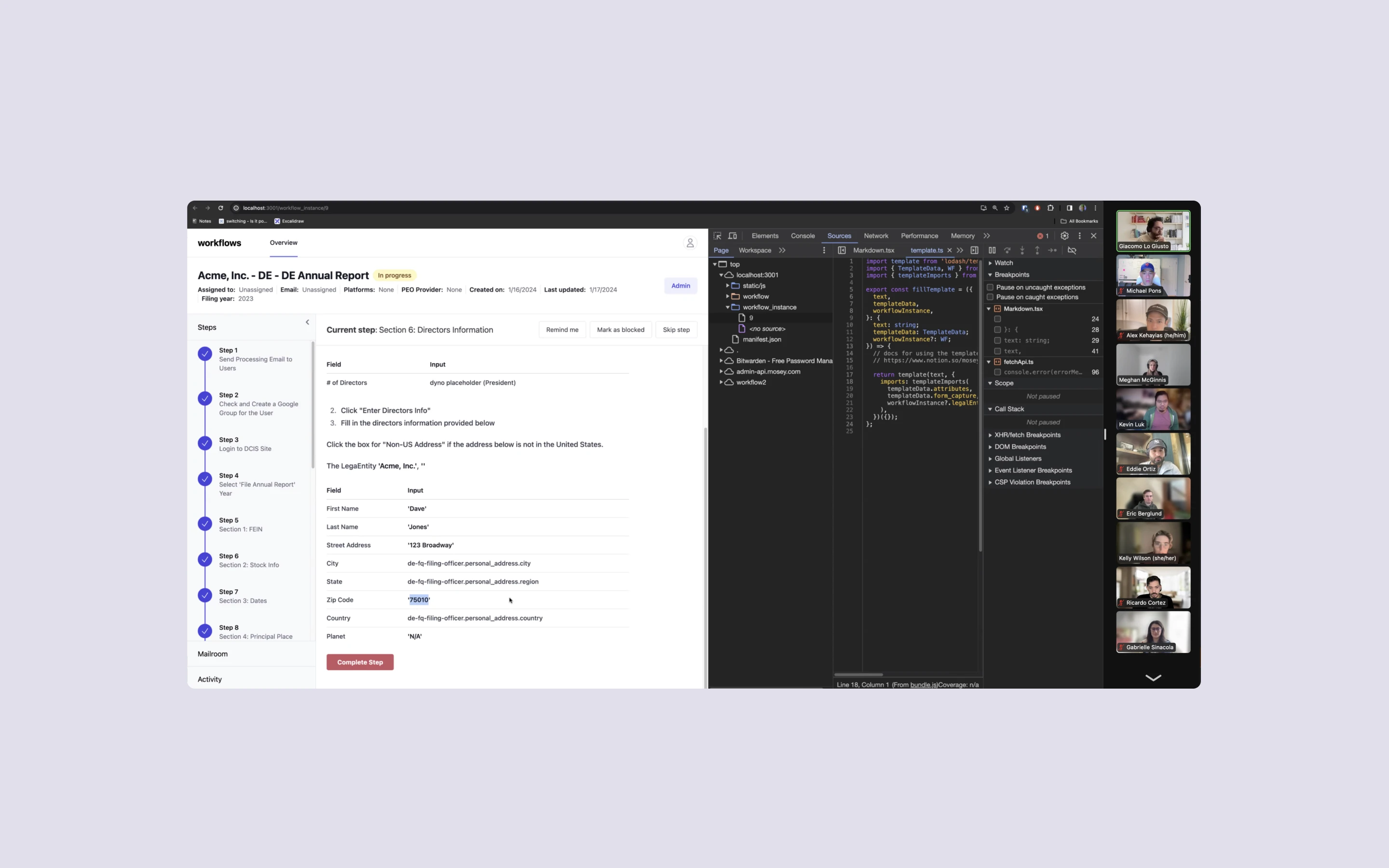
Mosey's existing internal tool was a database admin panel exposed as navigation. Flat entity lists. Raw markdown with template variables. No guardrails, no state visibility, no progress indicators. Every action required context that only lived in the heads of three engineers. The team needed to 5x their automation workforce, and the tool made that impossible. Adding headcount was not viable until the tooling itself was optimized.
Stakeholders knew the tooling was broken but couldn't articulate what fixed looked like. They were too close to the workarounds to name the problem cleanly. Two completely separate teams, Operations and Customer Success, were hitting identical friction points with different surface symptoms. Both relied on the same tribal knowledge, the same Slack workarounds, and the same single engineer who held all the institutional context. The tool wasn't failing at one job. It was failing at the core job of making itself teachable.
Key Friction Points
Exposed Data as a UI: Raw admin panel on localhost. Database entities surfaced directly as navigation. No information architecture.
Markdown and Code: Step instructions written in markdown with template variables. Required engineering context to interpret.
No State Visibility: No progress tracking, no completion indicators, no way to see where you left off or what was blocked.
Tribal Knowledge Required: Every action required context only held in the heads of three engineers. Impossible to scale past that team.
SOLUTION
Three jobs, three zones, one screen
Engineers could navigate, decide, and validate without context-switching, without tribal knowledge, and without leaving the workflow
How We Solved It
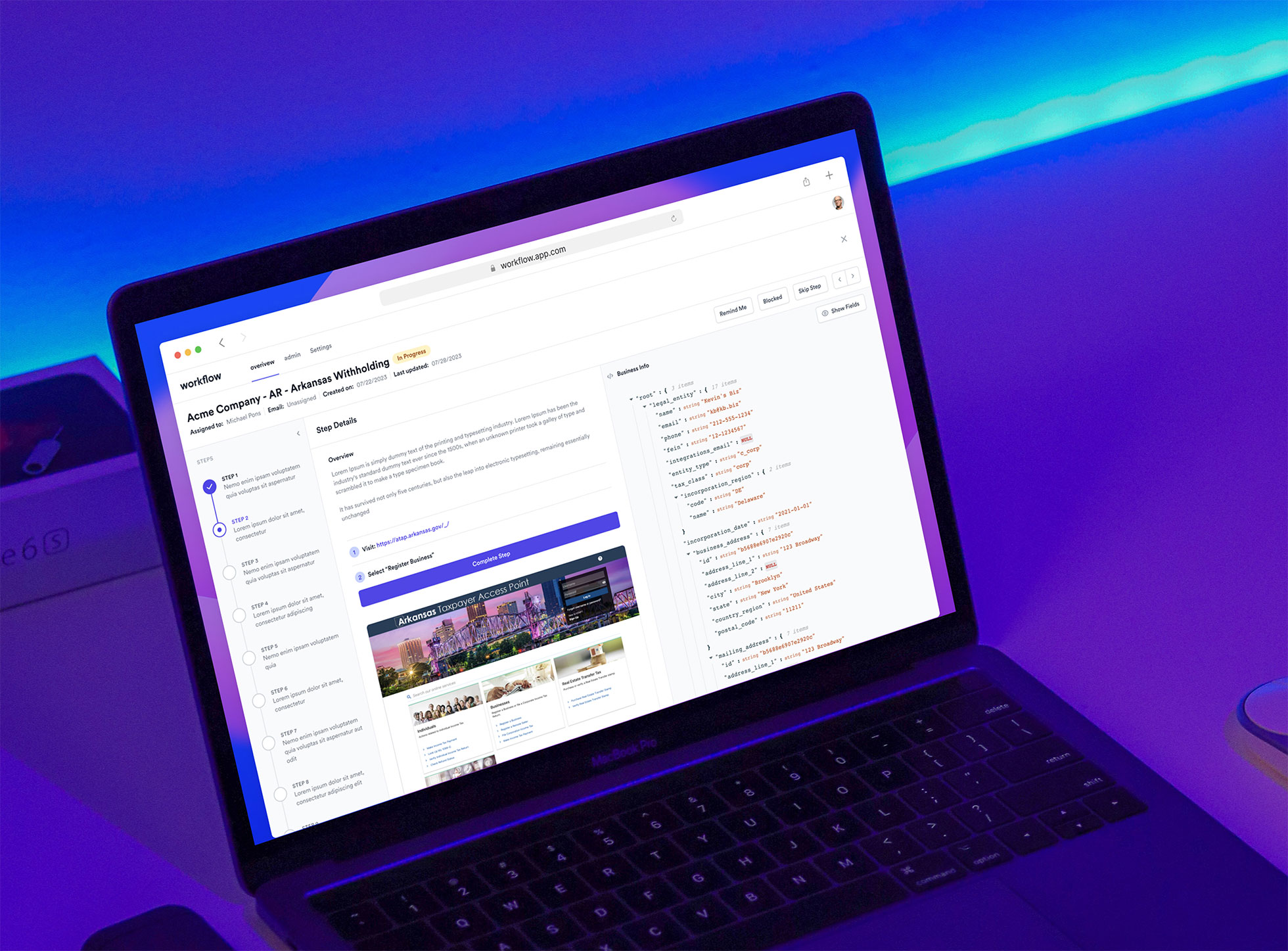
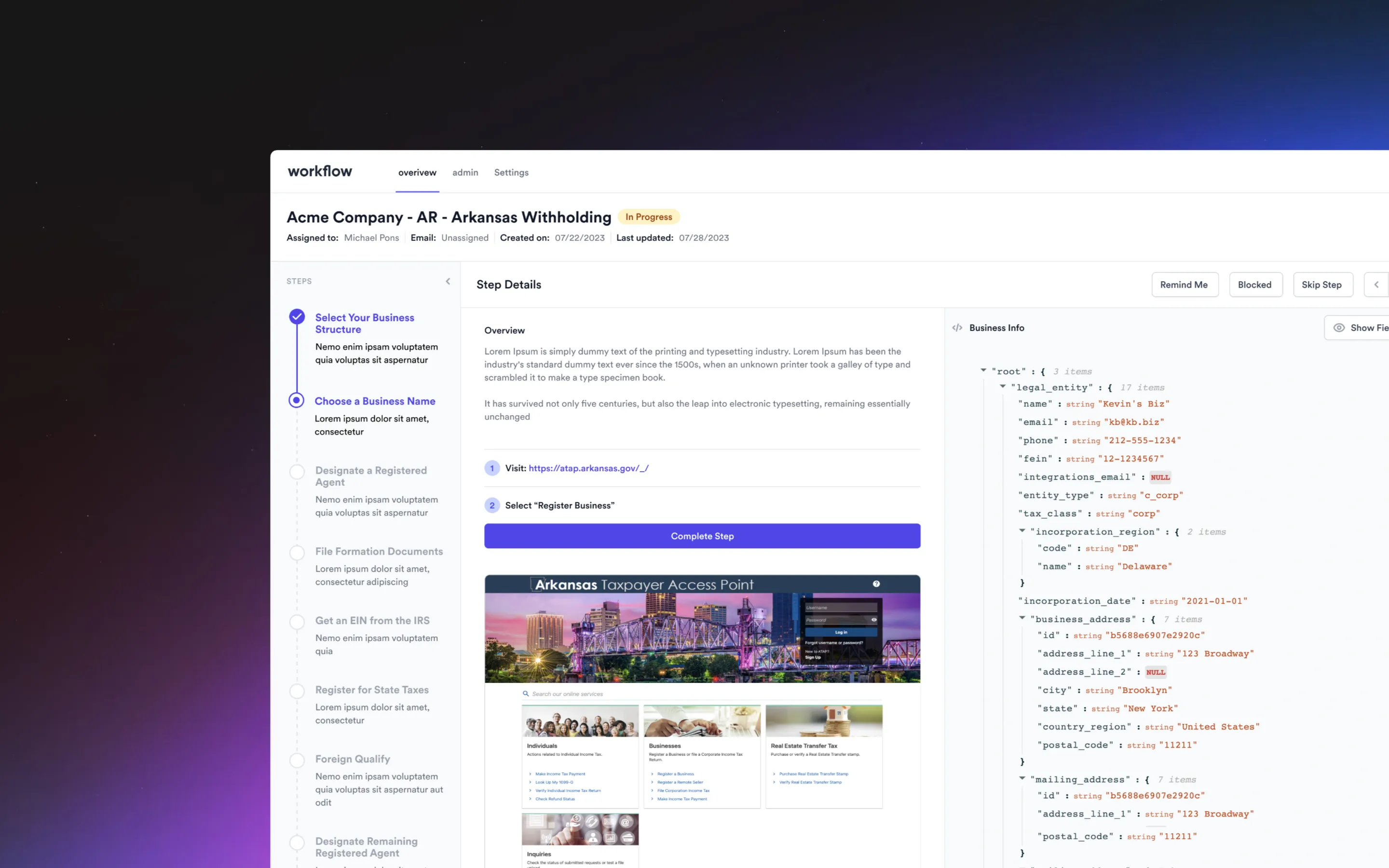
Mosey's automation work breaks down into three jobs: know where you are in the compliance process, execute or escalate every requirement, and verify the data before it ships. The existing tool forced all three into a single undifferentiated surface. Database entities were passed through as UI, with no guided flow and no separation of concerns. We took those same three jobs, evaluated their core workflows, and designed three purpose-built zones into a single screen.
Every step resolves one of two ways. The engineer completes the automation, or flags it for triage with structured context. No Slack threads, no ambiguity, no one-off decisions that required pulling an engineer off the critical path. The system forces a clear decision at every step, and the three zones give engineers everything they need to make that decision without leaving the workflow.
Opportunity Areas
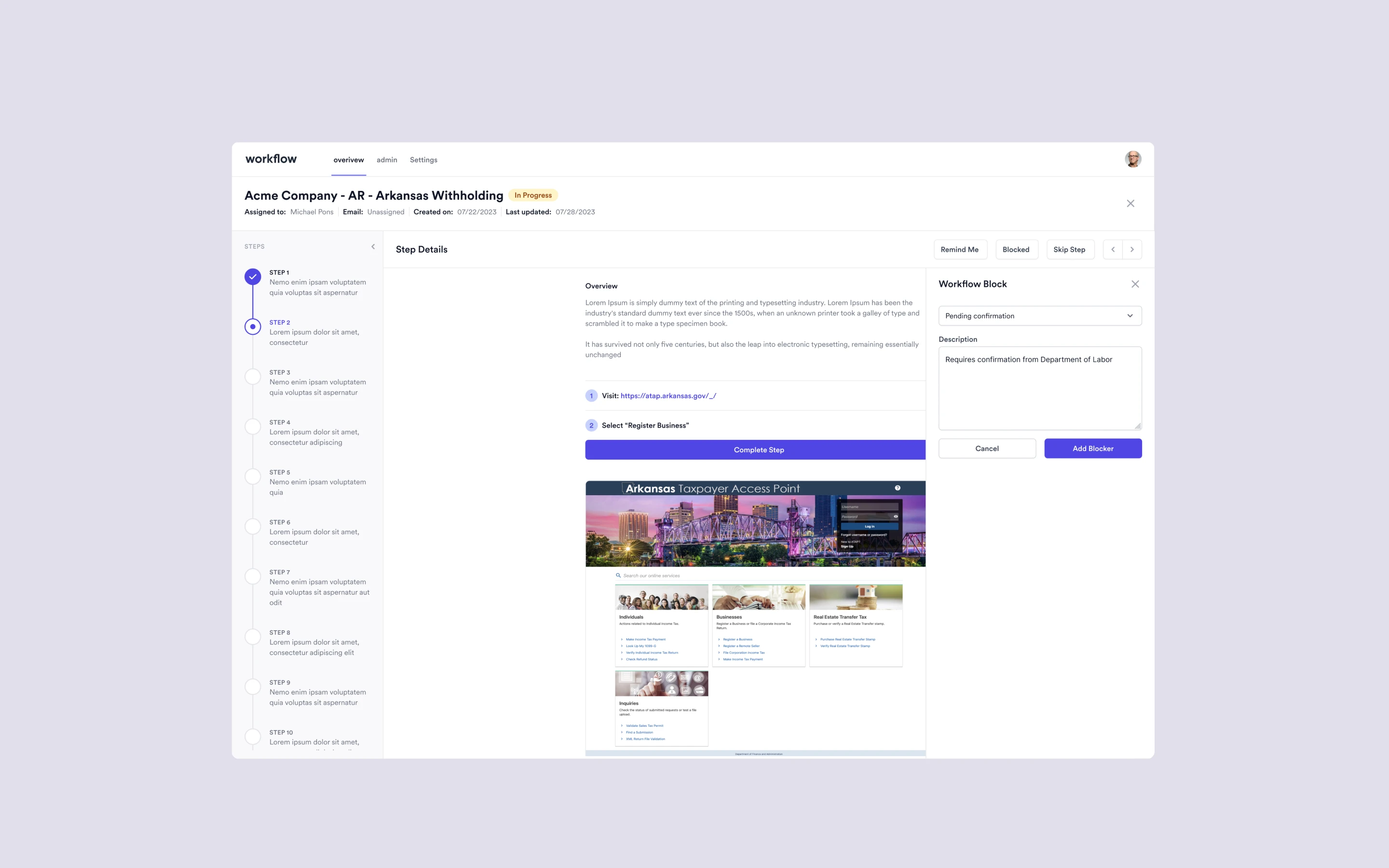
Navigate + Audit: A zone that mirrors Mosey's customer-facing step sequence, putting the engineer's compliance journey in lockstep with a source of truth the team could rely on.
Automate or Triage: Every requirement resolves one of two ways. Automate it, or flag it for triage with structured context. No Slack threads, no ambiguity.
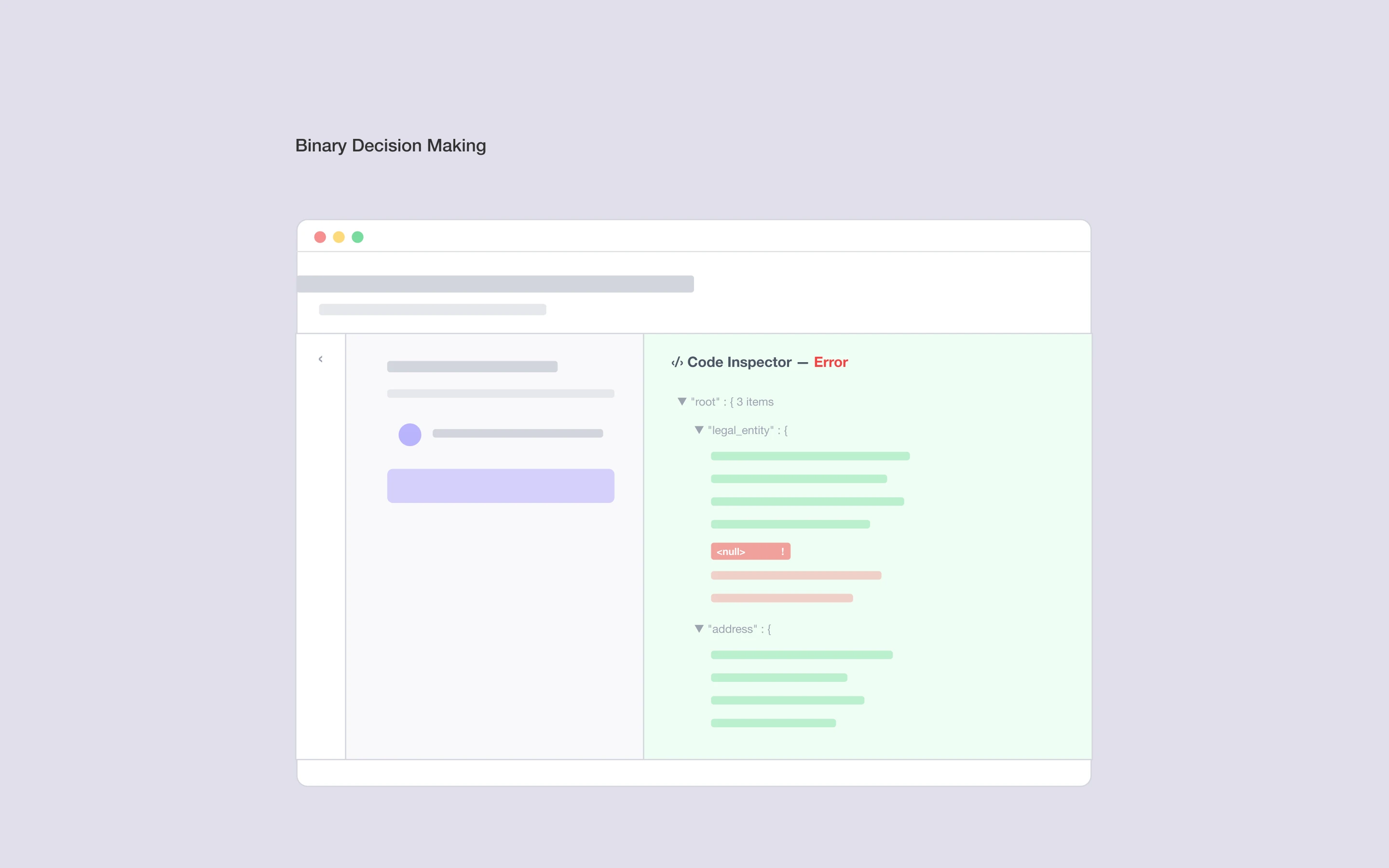
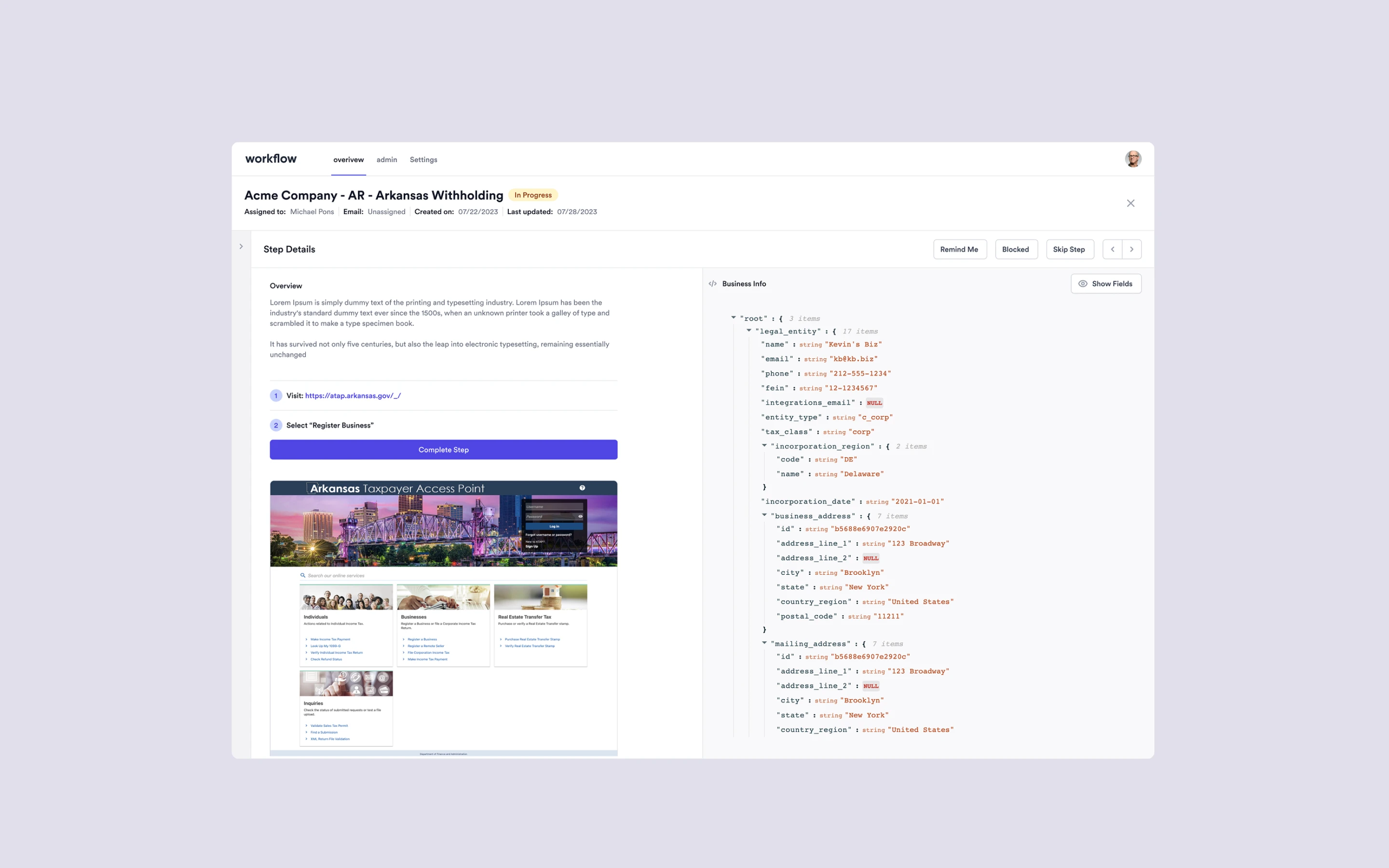
Validate or Flag: Business entity data, template variables, and configuration values surfaced inline. NULL values flagged red. Engineers and QA verify automations resolve correctly before they go live.
Built for Scale: The same three-zone layout scales from one engineer to fifty without retraining, because the workflow is embedded in the interface, not in anyone's head.
RESEARCH
The discovery had already happened, over two years
What we already knew
This project didn't start with a formal discovery phase. After 2+ years as Mosey's sole designer, I had accumulated the context most projects spend weeks gathering. I'd watched operations struggle with the admin panel daily. I'd seen customer success work around the same limitations. I'd sat in the meetings where scaling was discussed and tooling was always the bottleneck.
Stakeholders couldn't articulate the ask because they were too close to the workarounds. We synthesized the brief from direct observation of what was breaking and where the team was compensating.
Common Themes
One Daunting Deadline: Engineers needed to execute compliance tasks across all 50 states from day one, with no ramp period.
Common Friction: Operations and Customer Success hit the same friction points despite different responsibilities, which meant the root cause was the tool, not any single workflow.
Institutional Knowledge: The existing admin tool required engineering-level context to operate. That didn't scale past the three engineers who held it.
Bad UX Doesn't Scale: Adding headcount was not viable until the tooling itself was optimized. Growth depended on the tool, not on the team.
ANALYSIS
Two teams, one shared bottleneck
Operations and Customer Success were hitting the same friction points despite different responsibilities
Mapping the two workflows side by side revealed identical breakdowns. Both teams relied on the same tribal knowledge, the same Slack channels, and the same single engineer who held all the institutional context. Two completely separate teams, with different goals and different daily routines, were both bottlenecked by the same tool limitations.
That convergence pointed to a single conclusion. The redesign didn't need two workflows or two surfaces. It needed one tool that solved for the shared root cause. The three core jobs an automation engineer performs became the organizing principle. Each zone eliminated a specific dependency on tribal knowledge: the navigation zone replaced institutional memory of step sequences, the execution zone replaced Slack-based decision-making, and the validation zone replaced manual data lookups in the database.
Mapping the Jobs
Operations Workflow: Automation execution, triage routing, and engineer onboarding. Every path required tribal knowledge at the decision points.
Customer Success Workflow: Coverage verification, customer escalation handling, and compliance accuracy checks. Same root cause, different surface symptoms.
Shared Bottleneck: Both workflows bottlenecked on the same tool and the same single engineer. Fixing the tool solved both jobs at once.
JTBD Framework: Three zones mapped directly to the three jobs: orient, decide, verify. Each zone eliminated a specific tribal knowledge dependency.
ITERATIONS
Framing the design challenges
Four questions that reframed the problem from "fix the admin panel" to "build the operational infrastructure for scale"
The analysis pointed to a single root cause. Mosey's internal tooling couldn't keep pace with the product's external promise. Mosey sold automation to its customers. The tool making that automation possible was manual. Four how-might-we questions reframed the problem. Each one mapped to one of the insights from the analysis: the tribal knowledge dependency, the gap between external automation promise and internal manual process, state-by-state complexity, and the inverse relationship between growth and operational speed.
How Might We
Eliminate tribal knowledge dependencies so scaling doesn't require institutional context?
Build internal tooling that lives up to the same automation promise Mosey sells to its customers?
Make state-by-state complexity invisible to the engineer executing the work?
Create a system that gets faster as Mosey grows or as compliance evolves?
Solution Overview
Navigate + Audit: Engineers orient themselves across thousands of requirements spanning all 50 states, in lockstep with the customer-facing compliance journey.
Automate or Triage: Every requirement resolves one of two ways. Automate it, or flag it with structured context for triage. No Slack DMs asking what to do.
Validate or Flag: Business entity data and template variables surfaced inline. Engineers and QA verify automations resolve correctly before they ship.
01
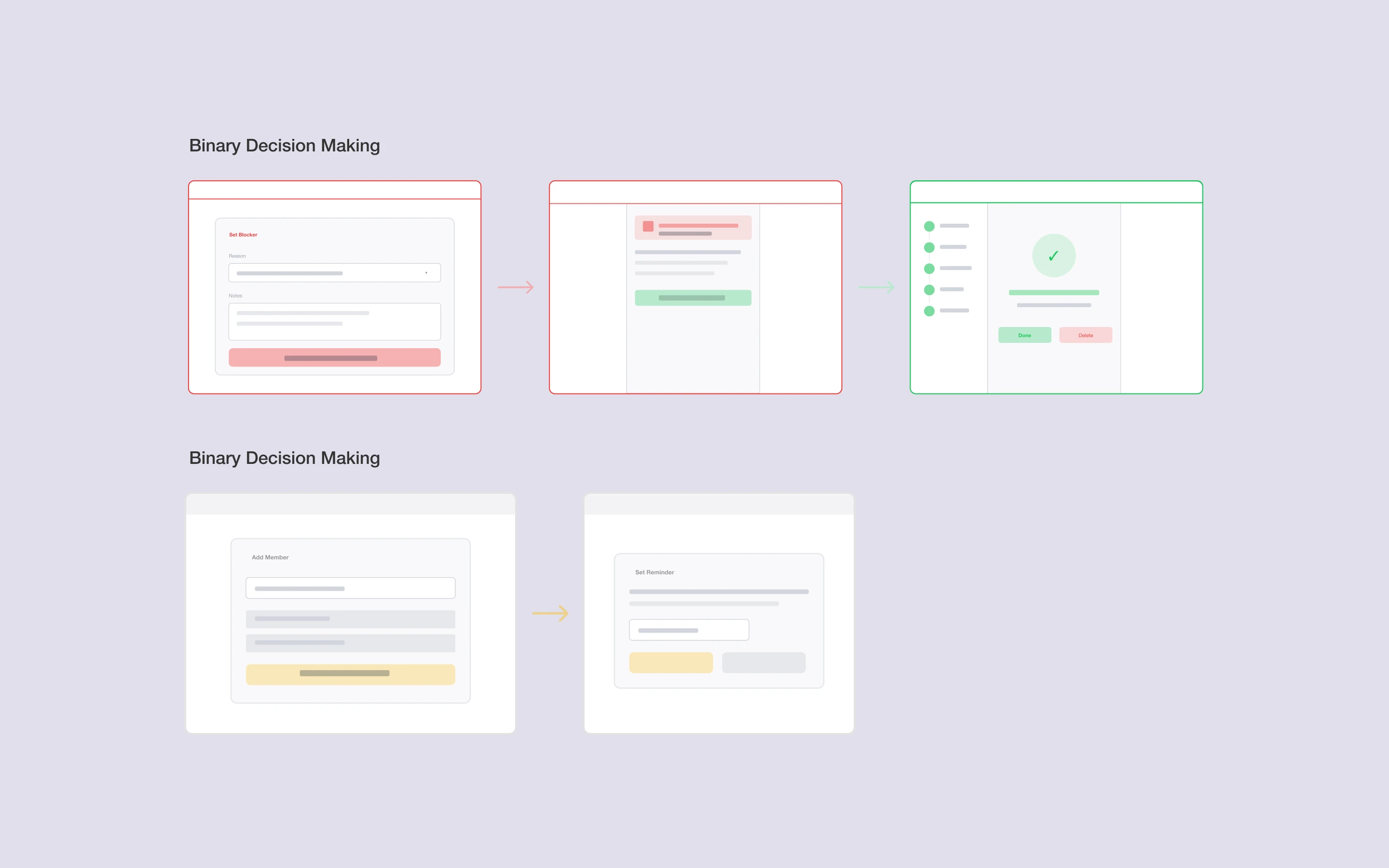
Binary Decision Making
Every step resolves one of two ways: the engineer completes the automation, or flags it with structured context for triage. No ambiguity, no Slack DMs asking what to do.
02
Proactive Automation
Not every requirement applies to every state. The platform dynamically removes irrelevant work based on state and entity type, so engineers only see what actually matters.
03
Non-negotiable Guardrails
The validation zone exposes raw data (entity info, template variables and configuration values) so users can confidently verify automations resolve correctly before they ship.
FINAL DESIGNS
Shipped and demo-ready in four weeks
Production-ready by end of week four. Deployed to the first wave of twenty-five engineers with zero training sessions
Two weeks of design. Two weeks of development. The platform went live to the first wave of 25 automation engineers with no training sessions and no one-on-one onboarding. The tool handled onboarding by design, because the three-zone layout made the workflow teachable without a teacher. When Mosey doubled the team to 50 in the second wave, nothing about the onboarding process changed. The same tool carried the same load.
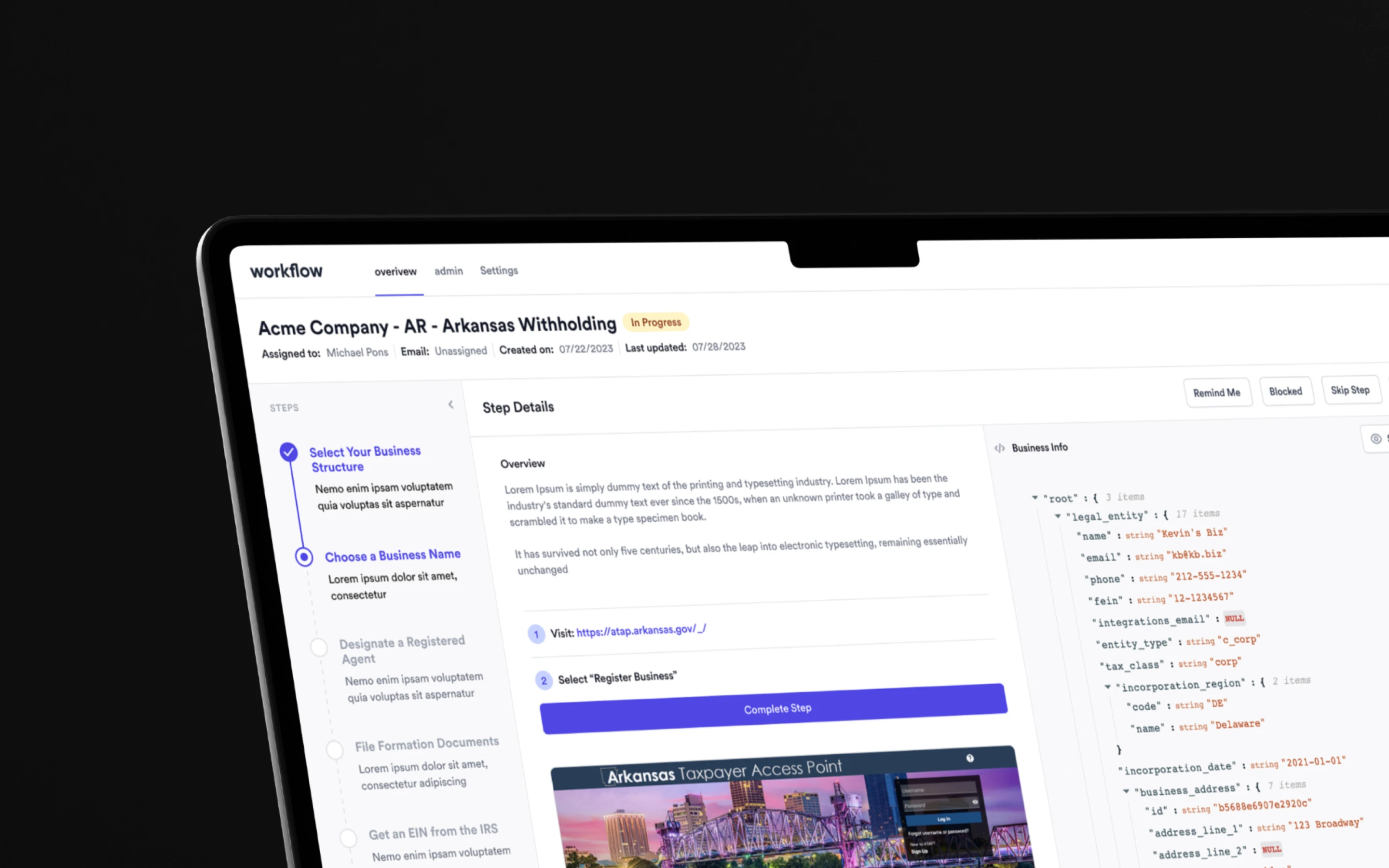
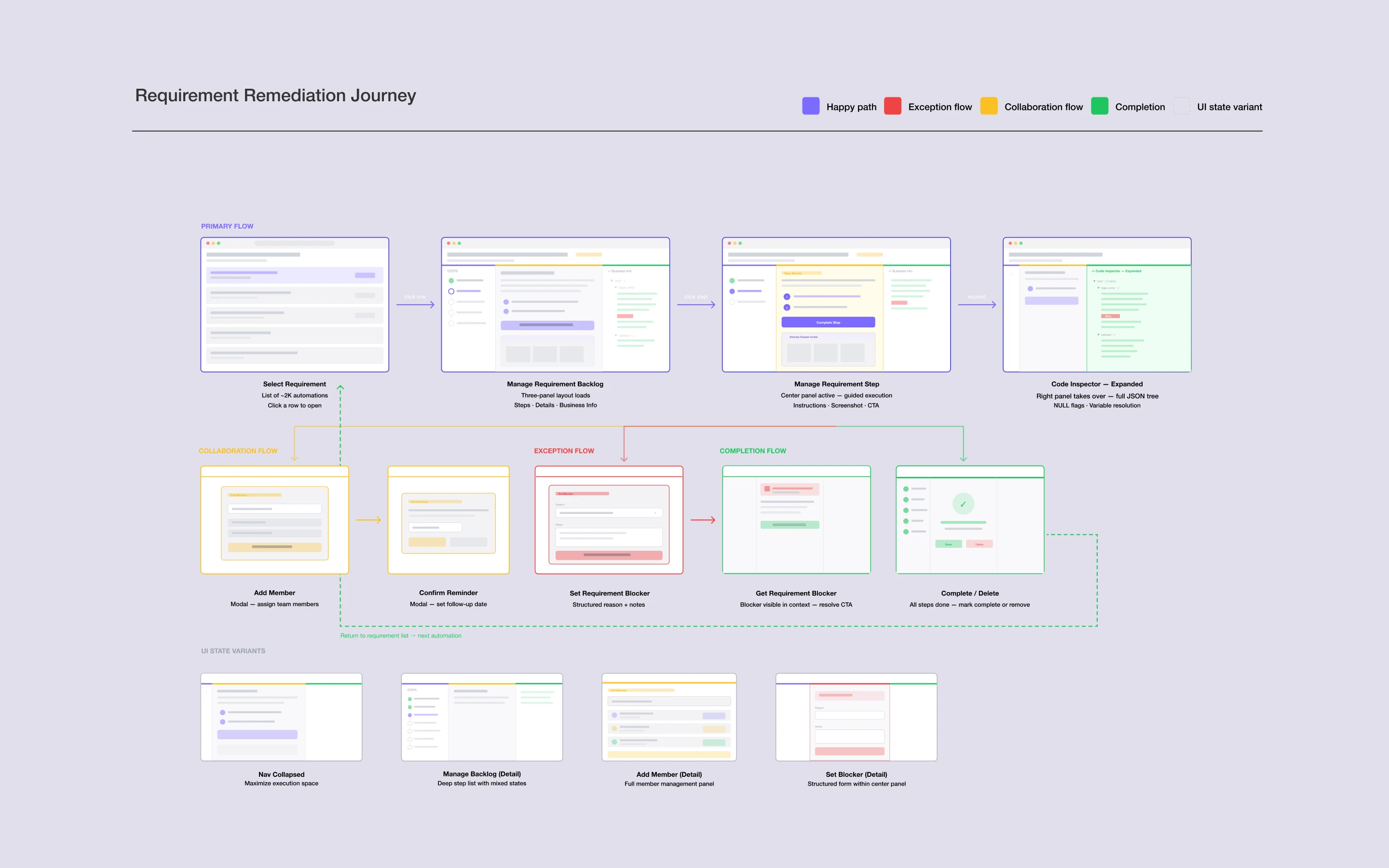
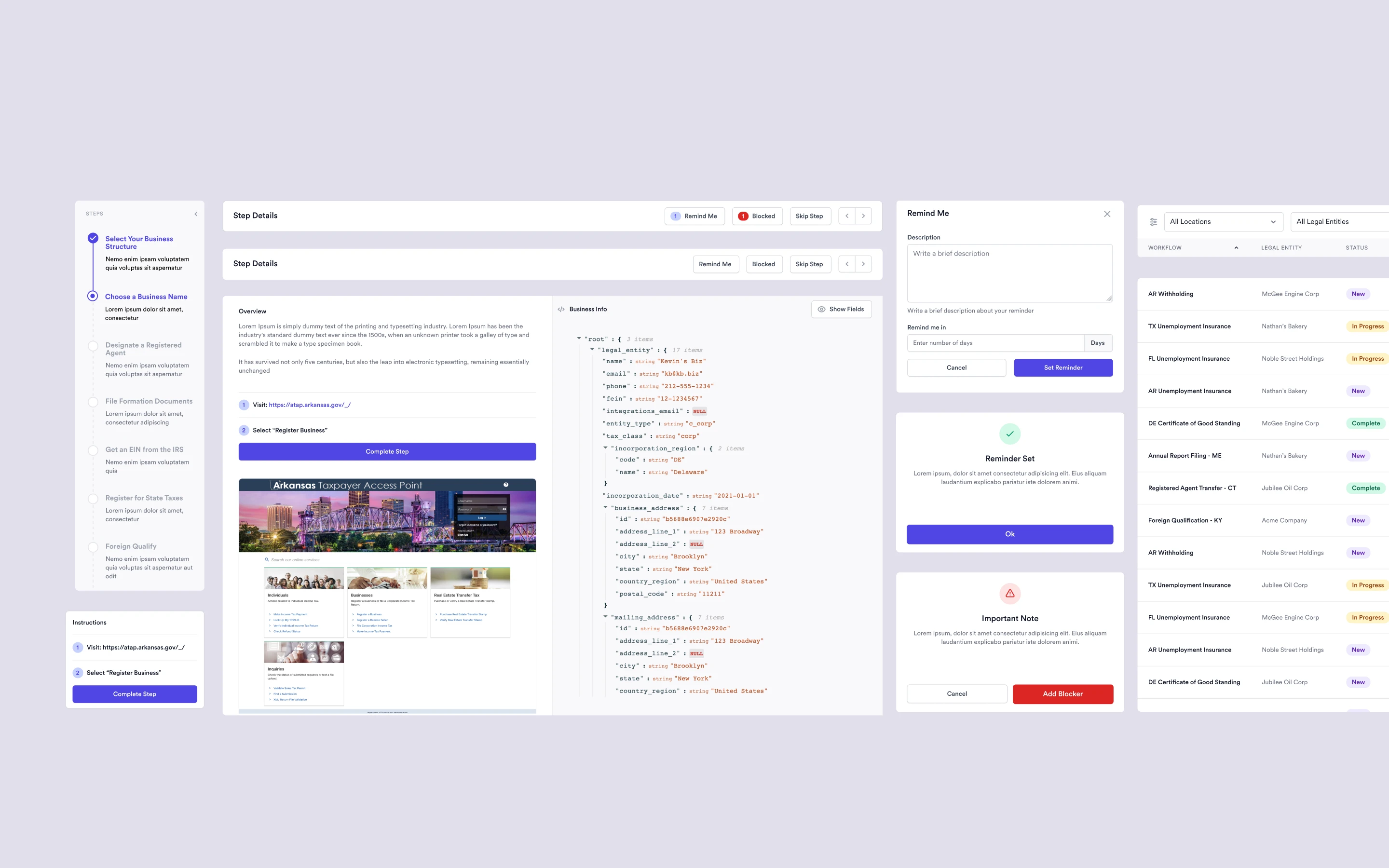
The shipped product included the overview table that lets engineers audit the full compliance portfolio at a glance, and the three-zone execution view where they spend 75% of their time navigating, deciding, and verifying.
The Final Product
Advanced Filtering: Engineers filter requirements by entity, stage, or custom criteria to navigate thousands of requirements quickly.
Step-by-Step Interface: The interface guides engineers through each stage of a requirement, with the current step always visible and the next action clearly surfaced.
Binary Decision Making: Every step resolves one of two ways. Complete the automation, or flag it for triage with structured context. No ambiguity, no Slack.
Integrated Guardrails: Business entity data, template variables, and configuration values surfaced inline. NULL values flagged red. Verification happens before anything ships.
Built-In Reminders and Blocking: Engineers can set email reminders, block specific steps with justification, and surface dynamic status updates based on flagged state.
IMPACT DELIVERED
Acquired by Gusto
The compliance infrastructure built in four weeks became central to what made Mosey worth acquiring
The redesign didn't just improve the tooling stack. It fundamentally removed friction from automating workflows, enabling Mosey to operate at a scale that earlier tooling made impossible. The DevOps engineering team scaled from 5 to 50 without a single onboarding change, because the tool handled onboarding by design. Customer Success stopped absorbing tribal knowledge overhead and started hitting coverage metrics the business could report on. The product matched how the work actually flows across 10,000+ compliance requirements, 50 states, and 1,000+ localities.
Mosey closed an $18MM Series A three quarters after the launch. In April 2026, Gusto acquired Mosey. The compliance infrastructure built during this engagement was central to what made the product worth acquiring.